Sell is live huryy up! 🎉
Make it yours

Keep Your Business Passwords Secure & Under Control

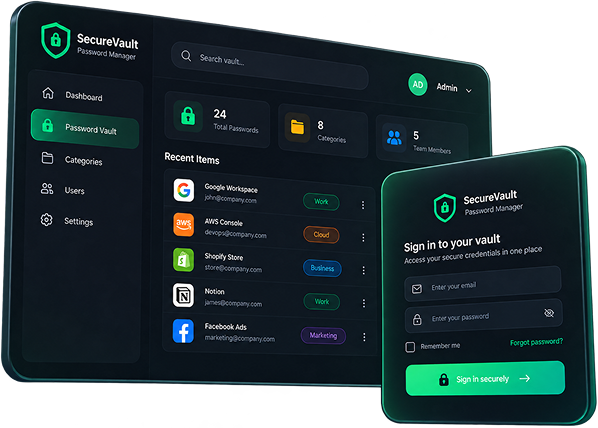
Store, organize and manage your business passwords in one secure, self-hosted system. Give the right people access to the right credentials, without relying on spreadsheets, chat messages or scattered notes.
VIEW DEMO
One Time Payment
Self Hosted
No Monthly Fees
Using the wrong place puts your business at risk

Where are your business passwords right now?

WhatsApp
Passwords can get buried in conversations or shared with people who shouldn't have access.
Excel Sheets
Spreadsheets make shared credentials difficult to organize and control.
Browser Saved
Browser password storage is designed for personal convenience, not team access management.
Personal Notes
Scattered notes make it harder to organize and securely manage business credentials.

Your business passwords deserve a better system

WP Passdesk gives your team one central place to store, organize and manage business credentials, with access controls designed to help you decide who can see what.
Access management

Give the right access to the right people

Not everyone on your team needs access to every password. WP Passdesk gives you three access levels so you can control who can manage credentials, who can access them, and which passwords or categories should remain restricted.
GET WP PASSDESK at ₹849
Master
Complete control over your password vault, users, categories, settings and business branding.
  • Create, edit and delete passwords
  • Manage users and their access
  • Create, edit and delete categories
  • View activity logs
  • Restrict passwords and categories
  • Manage system settings and branding
Full Control
Manager
Manage assigned credentials while keeping restricted passwords and categories protected.
  • Add and edit permitted passwords
  • Access assigned passwords and categories
  • Manage permitted credentials
  • Cannot view restricted passwords
  • Cannot access restricted categories
Managed Access
User
Give team members access only to the passwords and categories they need to do their work.
  • Access permitted passwords
  • Access assigned categories
  • Cannot view restricted items
  • Cannot access restricted categories
Limited Access
Extensive features

Everything you need

Add, Edit, Delete
Create, update and remove business passwords whenever you need to.
Categories
Keep credentials organized by clients, departments, tools or projects.
Access Restrictions
Restrict specific passwords or categories from users who don't need access.
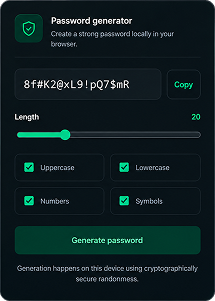
Password Generator
Create strong passwords quickly with customizable generation options.
Strength Meter
Check password strength before saving credentials to your vault.
Import & Export
Move your password data in and out of WP Passdesk when needed.
Business Branding
Customize your vault with your business name, logo, colors and favicon.
Fully Encrypted
Protect stored credentials with encryption to keep data secure.
Activity Logs
Keep track of important activity within your password management system.
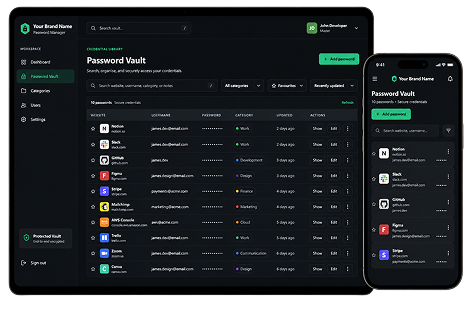
Responsive UI
Manage your credentials comfortably across desktop, tablet and mobile devices.
Quick Search
Find the password or credential you need without digging through categories.
Centralized Vault
Keep your business credentials organized in one dedicated password management system.

Powerful password generator
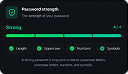
Create stronger passwords in seconds with the built-in password generator. Customize and then check the password strength before saving it to your vault.

Make it yours.
Your brand, your vault
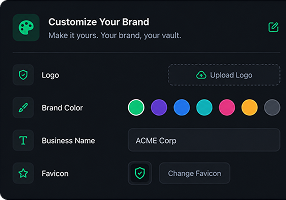
Customize your vault with your business name, logo, colors and favicon so your password manager fits naturally into your existing brand.

Access your vault across devices

Use WP Passdesk across desktop, tablet and mobile screens with a responsive interface designed for everyday business password management.

Not every password is meant for everyone
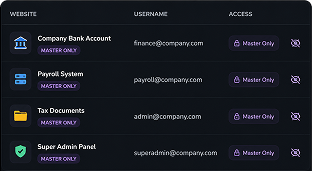
Keep sensitive credentials away from users who don't need them. Restrict passwords or entire categories.

Build with security at the core

Business credentials need more than a convenient place to live. WP Passdesk is designed around controlled access, encrypted storage and self-hosted deployment so your business can keep its password management closer to its own environment.
Encrypted Storage
Protect stored credentials with encryption designed to safeguard sensitive password data.
Protected Data Access
Control who can access passwords and categories based on their assigned permissions.
Self Hosted & Private
Run WP Passdesk on your own WordPress environment instead of relying on a third-party platform.

Who is it for?

Built for businesses and teams that need a simple way to organize credentials and control access.
  • Business Owners
  • Agencies & Freelancers
  • Educational Institutes
  • WordPress Agencies
  • Remote Teams
  • IT Teams
No subscription. No hidden fees.

Simple pricing, one time payment

Offer 80% OFF
Password Manager
₹ 849
₹ 12,449
One time payment
Get the WP Passdesk product with the installation video guide and everything you need to set it up on your WordPress website.
GET WP PASSDESK at ₹849
Recommended
Password Manager + Setup
₹ 1,249
₹ 14,449
One time payment
Get WP Passdesk plus setup by our team. We'll help install and configure the password manager on your WordPress website.
GET COMPLETE PACKAGE
One Time Payment
Self Hosted
No Monthly Fees

WP Passdesk is a self-hosted password manager for businesses and teams. It lets you securely organize business credentials, manage categories and control which users can access specific passwords.

Yes. WP Passdesk is designed to run within a WordPress environment, allowing you to manage your password vault through your own WordPress website.

WP Passdesk is designed for business owners, agencies, freelancers, WordPress agencies, educational organizations and teams that need to manage shared business credentials.

Master has full system control. Manager can manage credentials according to assigned permissions, while User receives access only to the passwords and categories available to them.

Yes. WP Passdesk allows authorized users to restrict individual passwords and categories so they aren't visible to users who don't need access.

Yes. You can customize supported branding elements such as your business name, logo, colors and favicon.

Yes. WP Passdesk is designed to run on your own WordPress installation rather than requiring you to store your password vault with a separate password-management service.

Yes. The setup package includes installation and configuration assistance from our team.

After your purchase, you'll receive the product and the relevant installation/setup information based on the package you selected.

Check all the reviews

What early users are saying

5.0
Ratings
Rahul Mehta
— Agency Owner
We were managing client passwords across spreadsheets, which was becoming difficult to control. Passdesk gave us one place to organize everything and manage access properly.
Priya Sharma
— Business Owner
The setup was straightforward and the interface is easy to understand. I especially like being able to restrict certain passwords so they aren't visible to everyone on the team.
Arjun Patel
— Orbit Marketing Agency
We manage credentials for multiple projects, so keeping everything organized is important. WP Passdesk makes it much easier to find the right credentials and control who can access them.
Neha Verma
— Digital Marketing Agency
I wanted something self-hosted instead of putting our business credentials into another external platform. WP Passdesk fits well into our setup and keeps everything in one place.
Amit Kumar
— Media House
Before WP Passdesk, our team was using a mix of notes and spreadsheets for passwords. Moving everything into one system has made managing our credentials much simpler, thanks to Passdesk.
Sneha Das
— Freelancer
I work with several clients and have a lot of different accounts to manage. The categories and quick search make it much easier to find the credentials I need without going through multiple files.
Rohit Singh
— IT Manager
The role-based access is one of the most useful features for our team. Different people can have different levels of access, which makes managing shared credentials much more practical.
Pooja Roy
— Operations Manager
The overall experience has been simple and practical. We can organize credentials by category, control access and keep our team's passwords in one dedicated system instead of scattered across different places.
Get started today 🎉

Stop risking your business passwords

Bring your business credentials into one secure, organized system and control who gets access.
Need support? Contact us at
Privacy Policy
© 2024 WP Passdesk. All rights reserved